Why Structure Is Everything
Campaign structure is the foundation of everything in Amazon PPC. Get it right, and every optimization you make (bidding, targeting, budgets) becomes easier and more effective. Get it wrong, and you'll spend months chasing performance problems that are actually structural problems.
This is a touchy subject for a lot of Amazon advertisers. There are fierce debates about single keyword campaigns versus single product ad groups, how many keywords to include per campaign, whether to segment by match type, and when to negate from source campaigns. Everyone has opinions. Most of them are...incomplete.
AdLabs manages $1B+ in annual Amazon ad spend for 6,500+ advertisers, from five-product accounts spending six figures a month to catalogs with 400,000+ SKUs. We've tested every structure, made every mistake, and refined our approach over years of iteration.
This guide is the distillation of all of it.
There's no single "best" campaign structure. There's the best structure for your account, and the skill to know which one to deploy and when.
Foundational Principles
The Granularity Spectrum
Every campaign structure decision is a tradeoff between control and simplicity. On one end of the spectrum, you have total aggregation (everything lumped together, easy to manage, but impossible to optimize precisely). On the other end, you have total segmentation (every keyword in its own campaign, maximum control, but an operational nightmare for most teams).
The sweet spot for the overwhelming majority of accounts is single product ad groups: the structure we recommend as the baseline for 80–90% of accounts. From there, you add granularity only where it's justified by data, budget, and management capacity.
The Two Jobs of Amazon's Algorithm
Before diving into structure, remember what Amazon's algorithm is actually trying to do. It has exactly two objectives:
- Give shoppers the best experience: put the most relevant product at the best price in front of every search query.
- Make Amazon as much money as possible: advertising is one of Amazon's three largest revenue generators alongside AWS and retail sales.
These two objectives inform everything about how structure interacts with performance. Amazon wants you to spend more. They're not going to limit your impressions because you have "too many keywords" because that would mean they make less money. Keep this in mind as we debunk myths throughout this guide.
Campaigns Have Settings. Ad Groups Have Targeting. Products Have Performance.
This is the critical mental model. When you're deciding how to group things together, ask yourself: what does each level give me?
- Campaign level: Budget controls, placement settings (top of search, product pages, rest of search, plus the off-Amazon ad serving setting added in August 2026), dynamic bidding strategy (up/down, down only, fixed)
- Ad group level: Product-to-keyword relationships, individual bids per keyword, negative keyword targeting at the ad group level
- Product level: Conversion rate, revenue per click, relevancy, which are the performance characteristics that dictate what your bids should be
If all your products within a campaign have similar performance characteristics, placement preferences, and ACOS goals, grouping them is fine. If they don't, you need more segmentation.
When deciding whether products belong in the same campaign, check these four criteria: Do they have similar budgets? Similar placement performance? Compatible dynamic bid settings? Aligned ACOS goals? If any of these diverge significantly between products, they likely need their own campaigns.
Campaign Naming Conventions

Why Naming Matters More Than You Think
Imagine being able to tell everything about a campaign (the product it promotes, the keywords it targets, its purpose, its ACOS goal) without ever opening it. That's what standardized naming gives you.
Proper naming conventions are paramount for three reasons:
- Reporting: Quickly filter and analyze performance by product, tactic, or match type without building custom reports.
- Account organization: Instantly understand a campaign's purpose, target, and goal just by reading its name.
- Efficient campaign management: Troubleshoot issues and implement targeted optimizations without guesswork.
What Every Campaign Name Should Include
- Product Title: The name or short descriptor of the product being promoted
- Product Category or Line (optional): Group by product line for easy filtering at scale
- ASIN: The specific product being promoted
- Ad Type: SP, SB, SD (Sponsored Products, Brands, Display)
- Tactic: Brand, Non-Brand, Competitor
- Targeting Type: Auto, Manual Keyword, Product Targeting
- Match Type: Broad, Phrase, Exact, PAT
- Goal: Research or Performance
- Target ACOS: The profitability benchmark
If a client asks about performance on a specific product category and its monthly spend, your response time is directly influenced by your naming conventions. With systematic names, you type the category into the search bar and get instant answers. Without them, you're pulling multiple reports and merging in Excel.
⚡ Campaign Name Generator
Fill in the fields below and copy your standardized campaign name.
Fill in the fields above...
Brand vs. Non-Brand: The Sacred Separation
If you're not segmenting your campaigns by brand and non-brand targeting, you are destroying your data.
This segmentation is absolutely pivotal. Branded keywords naturally have higher conversion rates and lower ACOS. If branded terms slip into your non-brand campaigns through broad or phrase match, they inflate your metrics and make your non-brand performance look better than it actually is.
- Always separate brand and non-brand campaigns
- Negate your own branded terms from non-brand campaigns
- Check search term reports regularly for brand term leakage
- Use naming conventions so you can instantly filter by tactic in the console
Campaign Structure Built In: No Naming Spreadsheet Required
The AdLabs Campaign Launcher builds Sponsored Products campaigns from saved templates with your naming convention, Amazon suggested bids and keyword recommendations. No more manual tracking, just a clean, structured account from day one.
Try Free →
The Four Campaign Structures
There are exactly four campaign architectures you can use on Amazon. Each has its place. The key is understanding when to use which, rather than marrying yourself to one approach across your entire account.
1. Multiple Product Ad Groups (MPAGs)
A basic structure: one campaign, one ad group, multiple products all targeting the same keywords with the same bids.
We audit accounts constantly where the entire structure is catch-all campaigns. The top spending campaigns are literally named "Catch All 2022," "Catch All Push," "Catch All Fed." One had $13,000 in spend across 63 products in a single ad group. Performance was all over the map, with some products at 15% ACOS and others at 100%+, and there was nothing the manager could do to fix the high-ACOS products without destroying performance on the good ones.
Why MPAGs fail:
- No product-keyword correlation. You can't see which product converted on which keyword. You can't set different bids for different products on the same keyword.
- Revenue per click varies wildly. A $15 product and a $150 product need fundamentally different bids on the same keyword. In an MPAG, they share a bid.
- Limited visibility. Only one ad per ad group can display per search query. Five products in one ad group means you can only ever win one placement. Five products in five ad groups means you can win up to five placements, giving you 5× the visibility.
The one upside: MPAGs can produce cheap clicks. Amazon's algorithm is good at pairing products with converting queries, and the aggregated approach lets it do its thing. For accounts just starting out, this simplicity has value, but it's a ceiling, not a foundation.
For large catalogs with hundreds or thousands of SKUs, catch-all campaigns can actually make sense, as long as you group products with the same or similar target ACOS together. This keeps the structure manageable while still maintaining some level of performance alignment across the products sharing a campaign. The key is intentional grouping, not just dumping everything into one bucket.
2. Single Product Ad Groups (SPAGs): The Baseline
This is the structure we recommend as the starting point for virtually every account. One campaign organized by parent ASIN or product line, with each child variation in its own ad group, each with its own keywords and bids.
tennis racquet · $0.95
rackets for tennis · $0.80
blue tennis racket · $1.10
rackets for tennis · $0.65
professional racket · $1.80
pro tennis racquet · $1.40
Why SPAGs are the biggest step change in control:
- You can see which product converts on which keyword
- You can set different bids per product-keyword relationship
- You can negate at the ad group level, removing irrelevant terms for one product without affecting others
- Multiple products can win placements on the same search, dramatically increasing brand visibility
- Search term harvesting becomes product-specific and accurate
Going from multiple product ad groups to single product ad groups is the single biggest jump in performance and control you'll see. Everything after this (single product campaigns, single keyword campaigns) is an incremental extension of the same principle.
3. Single Product Campaigns
One product per campaign. This gives you everything SPAGs offer, plus campaign-level budget control and placement settings at the individual product level.
When to use single product campaigns:
- You have fewer than 50 products (manageable complexity)
- You need product-level budget caps (specific spend allocations per product line)
- Products have significantly different placement performance (one thrives at top of search, another on product pages)
- You're running high-spend, competitive campaigns where every lever matters
With 400,000 products, if each has 5 campaigns (auto, manual research, manual exact, product targeting, brand defense), that's 2 million campaigns. Each auto campaign needs negative ASINs for all your own products, which is potentially billions of rows on bulk sheets. At scale, single product campaigns become operationally untenable. Know your limits.
4. Single Keyword Campaigns
One keyword per campaign. The most granular possible structure. We'll cover this in depth in Part 8, but the short version: single keyword campaigns have their place for VIP keywords where you need surgical control over budget, placement, and bid, but they are not a universal best practice.
Here's a quick comparison of all four structures to help you decide which fits your account:
| Structure | Best For | Control Level | Complexity |
|---|---|---|---|
| MPAG | Simplest accounts, initial testing | Low | Minimal |
| SPAG | 80–90% of all accounts (baseline) | High | Moderate |
| Single Product Campaign | Fewer products, high spend | Very High | High |
| Single Keyword Campaign | VIP ranking keywords only | Maximum | Very High |
Match Types: The Targeting Dial
Match types control how specific your targeting is. Think of it as a dial from broad research to surgical precision.
Auto Campaign Match Types
Auto campaigns have four targeting segments: Loose Match, Close Match, Substitutes, and Complements. Of these, loose match and substitutes tend to be the most effective at discovering new converting terms. Complements often produce mixed results.
We generally say no. Splitting creates four campaigns per product (instead of one), spreads data thin, and adds budget management complexity, all for marginal gains. The only reason to split is if you want different placement settings or budgets per targeting type, and most accounts don't need that level of control on auto campaigns.
Manual Match Types
| Match Type | What It Does | Example Keyword | Could Trigger On |
|---|---|---|---|
| Broad | Widest net. Shows on synonyms, misspellings, reordered words. Great for research but can produce irrelevant traffic. | tennis racket | "racquet for tennis," "best tennis rackets for beginners," "badminton racket" |
| Phrase | Keeps your keyword phrase intact and in order, but allows words before/after. More targeted than broad, still useful for discovering long-tail variations. | "tennis racket" | "best tennis racket for beginners," "tennis racket sale" |
| Exact | Highest conversion rates, lowest volume. Shows only on your exact keyword (with minor plural/singular variations). Best for proven, high-value terms. | [tennis racket] | "tennis racket," "tennis rackets" |
| PAT (Product Targeting) | Targets specific ASINs. Shows on their detail pages AND on search queries those ASINs are indexed for. Not just "product page placements." It's actually a batch of keyword-index targeting. | ASIN: B07XYZ123 | Competitor's product page, search results where that ASIN ranks |
Should You Segment by Match Type?
Yes. Segmenting campaigns by match type is one of the highest-leverage structural decisions you can make. Each match type behaves differently, generates different search terms, and requires different bid strategies. When they're all mixed together in one campaign, you lose the ability to control spend and performance at the match type level.
Some managers argue this is overkill, but the data consistently tells a different story. Broad match keywords need room to discover new terms with more flexible bids. Phrase match provides a middle ground for long-tail exploration. Exact match is where your proven performers live and where you want the most precise bid control. Mixing these together means you're constantly compromising, optimizing one at the expense of another.
Separating by match type gives you cleaner data, more accurate bid optimization, and the ability to allocate budget independently to research (broad/phrase) versus performance (exact). It takes a bit more setup upfront, but the performance gains and clarity are well worth it.
At minimum, keep your broad, phrase, and exact match types in separate campaigns. This lets you set different budgets for research versus performance, apply different placement modifiers per match type, and optimize bids without one match type's behavior dragging down another.
Keyword & Product Targeting
The Standard Campaign Stack Per Product
For most accounts, each product should have approximately four to five campaigns:
- Auto campaign: Always running, casting the wide net for keyword and ASIN discovery
- Manual keyword research campaign: Broad + phrase match keywords for continued research beyond what auto finds
- Manual exact keyword campaign: Your proven, harvested exact-match keywords
- Product targeting campaign: Exact ASIN targets (competitor conquest, complementary products)
- (Optional) Brand defense campaign: Protecting branded terms
- (Optional) Category/Expanded product targeting campaign: Broader category-level targeting to discover new ASINs and reach shoppers browsing related products
Source Campaigns vs. Destination Campaigns
One of the most important concepts in Amazon PPC is keyword harvesting: the process of finding search terms that convert in your broader campaigns and moving them into more targeted campaigns where you can control bids and budgets precisely. We'll cover harvesting criteria and best practices in detail in Part 6, but first you need to understand the flow between campaign types.
Think of your campaigns as a funnel:
Cast the widest net to discover search terms and ASINs
Slightly narrower research to find long-tail variations
Proven converters for maximizing performance with precise bids
Exact ASIN targets for competitor conquest & cross-sell
Map your campaigns. Before you do any harvesting, create a simple spreadsheet that documents: source campaign name → source ad group → destination campaign → destination ad group → match type. This is your campaign mapping document, and it makes harvesting fast, repeatable, and error-free.
Have All Variations Bid on the Same Keywords
This is critical and often misunderstood. If you have five variations of a product (different colors, sizes, or bundles), all of them should be bidding on your main keywords.
Amazon tailors search results to individual shoppers based on their demographics, purchase history, and preferences. A shopper who typically buys premium products will see your Pro version. A bargain hunter will see your Basic version. Someone who always buys black items will see your black variant. If you only bid your "best performing" variation, you're invisible to every other customer segment. All variations in, different bids based on their individual performance.
Keyword Harvesting Done Right

The #1 Harvesting Mistake: Over-Harvesting
The most common mistake we see, across hundreds of accounts, is harvesting too aggressively. People look at their search term report, grab anything with one order, and stuff it into their manual campaigns. This creates three problems:
Keyword Research Sources
- Search term reports: Your campaign's actual performance data. The most direct signal you have.
- Search Query Performance (SQP) dashboard: First-party data from Amazon showing actual search volumes, impression share, click share, and purchase share per keyword. The gold standard for sellers.
- Search Frequency Rank (SFR): Available in Brand Analytics (Top Search Terms) in both Seller Central for brand-registered sellers and Vendor Central. Ranks the million most-searched terms on Amazon.
- Helium 10 / Jungle Scout: Third-party tools for reverse ASIN lookup and competitor keyword research. Great for supplementing first-party data.
Your search term reports only show keywords where your bids were high enough to win an impression. There could be high-volume, highly relevant keywords your auto campaigns never found because the CPC was too competitive. SQP shows you the keywords that matter for your category regardless of whether you've been targeting them.
This is one of the most debated topics in Amazon PPC. The argument for negating: perfect search term isolation, cleaner data, no "cannibalization" between campaigns.
Our default position: don't negate from source campaigns. Here's why:
- Cheaper CPCs. Auto campaigns and broad match often earn lower CPCs for the same search terms. Why kill a profitable placement?
- Multiple placements = more visibility. If your exact match campaign wins position 1 and your auto campaign wins position 8 on the same search, you just doubled your brand presence on that page.
- Bid calculation integrity. When you negate everything that converted from your auto campaign, your bid optimization breaks because you're now optimizing based only on non-converting traffic.
- New search discovery dies. Over time, you push your auto campaign bids so low (because you've negated everything that works) that it stops discovering new terms entirely.
The exception: if you're in an extremely tight budget scenario and need total spend control, negation from source can make sense. But for most accounts, the added complexity and lost visibility isn't worth it.
Amazon is explicitly clear: you cannot drive up your own CPCs by having the same keyword in multiple campaigns. The auction is account-based, so whichever campaign has the highest bid represents your account's top bid against competitors. Having overlap is not cannibalization. It's additional opportunity.
Two-Click Keyword Harvesting With Criteria That Actually Make Sense
Harvest winners into the right campaign in two clicks and negate waste in bulk. Campaign mapping sends each harvested term to the right campaign and ad group with your starting bid and match type, and you review every term before it moves.
Try Free →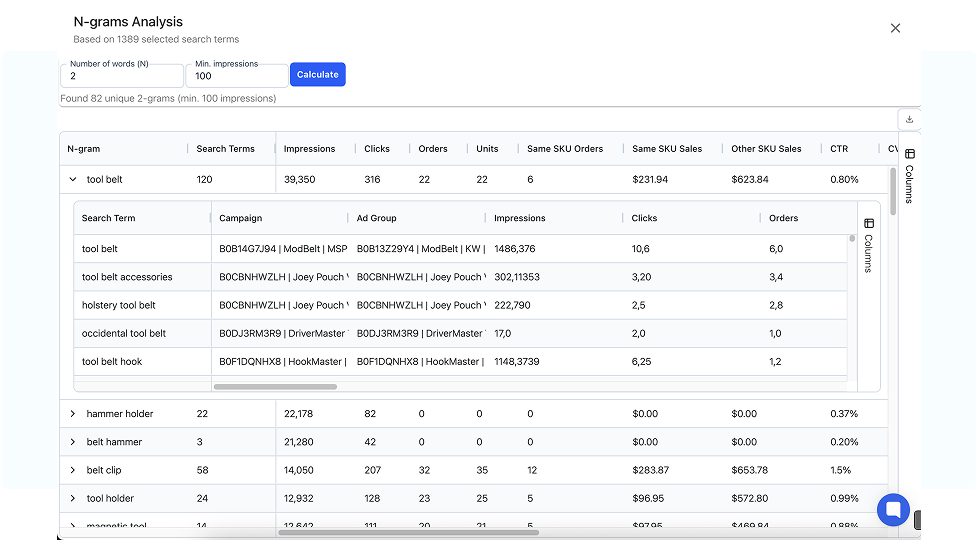
Negative Keywords: Cutting the Fat

The Three Mistakes Everyone Makes
Over-negating is arguably more destructive than over-harvesting. We see accounts where managers have nuked their sales by blindly applying automation rules. Here are the three criteria that get people in trouble:
Mistake #1: Negating High ACOS Keywords
If a keyword has any ACOS at all, it has a sale. You're negating something that works. The problem was the bid, not the keyword. Lower the bid instead.
Mistake #2: Negating High Spend, No Sales
The problem here is usually that the "high spend" threshold is wrong. If your product is $20 with a 50% target ACOS, your target cost per acquisition is $10. That's your threshold, not some arbitrary $50 or $100 number. And even at the correct threshold, the keyword might be relevant and the bid just needs adjusting.
Mistake #3: Negating Everything with No Sales
This is the most destructive. One person told us they selected everything in their auto campaign from the last 60 days with zero sales and negated it all. They obliterated their traffic. Here's why: if your average product needs 10 clicks to make a sale, and a keyword got 3 clicks with no sale, it wasn't failing. It just hadn't had enough attempts yet.
The only criteria for negating a search term is that it is irrelevant. If it's relevant, optimize the bid. If it's irrelevant, negate it. That's the entire framework.
When to Actually Negate
Negate when a search term is clearly irrelevant to your product. Examples:
- You sell shoes for kids and the search term is "shoes for teenagers"
- You sell rubber door stoppers and people are searching for "steel door stoppers"
- Wrong gender, wrong material, wrong category entirely
And focus your negation efforts on terms with volume. A long-tail search term that got one click and will never be searched again doesn't need to be negated. It just clogs up your negative keyword list.
Negative Exact vs. Negative Phrase
- Negative Exact: Blocks only that specific search term. Use for individual irrelevant terms that share words with relevant terms.
- Negative Phrase: Blocks any search containing that phrase. Use when an entire theme is irrelevant (e.g., negative phrase "steel" when you only sell silicone products).
N-Gram Analysis: The Power Tool for Finding Waste
N-gram analysis breaks every search term in your reports into individual word components, then aggregates performance across all appearances of each word. It reveals patterns invisible at the individual search term level.
We had a client selling silicone products. Individual search terms containing "steel" were each spending pennies. No single one would flag as a problem. But the n-gram analysis showed that every search containing the word "steel" across thousands of terms was collectively wasting hundreds of dollars. One negative phrase match ("steel") applied across all campaigns lowered ACOS by two percentage points.
Run n-grams when you first onboard an account, then monthly for the first few months, then quarterly. Early on, you'll find gold. Over time, the discoveries thin out as you've already cleaned up the major themes.
Campaign level: Applies to ALL ad groups in that campaign. Use when a theme is irrelevant across all products in the campaign (e.g., "steel" when everything you sell is silicone).
Ad group level: Applies only to that specific product's ad group. Use when something is irrelevant to one product but relevant to another (e.g., negative "large" from your small door stopper ad group, but not from your large door stopper ad group).
If you're using single product ad groups with multiple ad groups per campaign, ad group level negatives are essential for product-specific refinement. If you only have one ad group per campaign, campaign level is fine for convenience.
Single Keyword Campaigns & The Limits Debate
The Myth: Fewer Keywords = More Impressions
This is the conspiracy theory that won't die. The claim: Amazon limits impressions if you have too many keywords per campaign. Split them up and, magically, impressions increase.
We've tested this ourselves. Multiple times. The result: zero growth in impressions or clicks from splitting campaigns.
Think about it from Amazon's perspective. If you have 25 keywords in a campaign with a $100 daily budget, you're telling Amazon: "Here's $100, please charge me for clicks on these 25 keywords." If you add 75 more keywords, you're now saying: "Here's $100, please charge me for clicks on any of these 100 keywords." Why would Amazon give you fewer impressions when you're giving them more opportunities to charge you?
The "more impressions after splitting" effect has a simple explanation that has nothing to do with keyword count: when you split campaigns, you usually also reset budgets. Each new campaign gets its own $10 or $20 daily budget, increasing total potential spend. Or you unknowingly fix a bid or placement issue in the process. Correlation is not causation.
The Real Reasons Some Keywords Get Zero Impressions
- Your bid is too low: The simplest and most common explanation. You're not competitive in the auction.
- Budget exhaustion: Your campaign runs out of budget early in the day, and lower-priority keywords never get served.
- Low search volume: The keyword simply doesn't get searched enough. No amount of restructuring creates search demand that doesn't exist.
- Low relevancy: Amazon's algorithm doesn't think your product is a good match for that search term.
When Single Keyword Campaigns Make Sense
Single keyword campaigns are surgical ranking tools, not a default structure. Use them when:
- You have a high-volume, high-importance keyword that needs its own budget cap
- That keyword has unique placement performance (e.g., dramatically better at top of search) that warrants its own placement modifier
- You're running an aggressive ranking campaign and need to control daily spend precisely
- You have the software infrastructure to manage hundreds of campaigns without losing your mind
If you have an account with five products and you're spending $50,000–$100,000 a month in a hyper-competitive niche? Single keyword campaigns for your top 10 terms absolutely makes sense. If you have 5,000 products? You'd need to be very strategic about which keywords get this treatment.
One of the most powerful uses of single keyword campaigns: keep a high bid to win premium placements, but cap the daily budget to limit total spend. This lets you maintain order velocity through that keyword for ranking purposes without blowing your ACOS. It's aggressive on a per-click basis but controlled on a daily basis. Track organic rank on that keyword to see whether the extra velocity is moving it.
Placement-Level Reporting That Tells You What to Actually Optimize
See performance broken down by top of search, rest of search and product pages for every campaign. The Bid Optimizer sets placement modifiers from conversion rate lift in the same run as your bids, so you know where to raise them and where to pull back.
Try Free →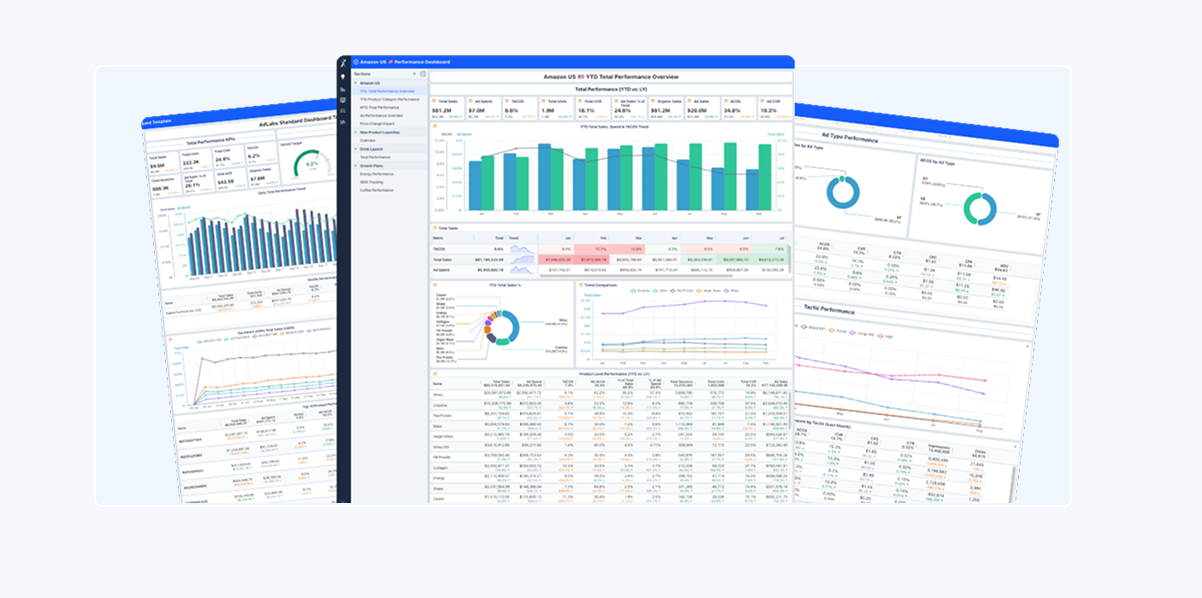
The Complete Playbook
Per-Product Campaign Setup
Here's the practical, repeatable system for setting up campaigns for any product:
| # | Campaign | Purpose | Match Types | Key Settings |
|---|---|---|---|---|
| 1 | Auto | Discover keywords & ASINs | Loose, Close, Substitutes, Complements | Moderate budget, lower bids for exploration |
| 2 | Manual Research | Expand keyword discovery beyond auto | Broad + Phrase | Research budget, moderate bids |
| 3 | Manual Exact | Maximize proven converters | Exact only | Performance budget, RPC-optimized bids |
| 4 | Product Targeting | Conquest competitors, cross-sell | ASIN targets | Moderate budget, bid per ASIN performance |
| 5 | Brand Defense | Protect branded search terms | Exact branded keywords | Defensive budget, ensure top placement |
An Example Weekly Optimization Schedule
Structure is meaningless without consistent optimization. Your exact cadence will depend on your account size, budget, and team capacity, but here's an example weekly schedule you could follow as a starting point:
- Monday: Bid optimization: Review the last 7-30 days of data. Adjust bids using RPC (Revenue Per Click) methodology. For low-data keywords, reference aggregate benchmarks from similar campaigns.
- Tuesday: Search term review: Download search term reports. Identify harvesting candidates (2+ orders, relevant, has volume). Identify negation candidates (irrelevant, has volume).
- Wednesday: Harvesting & negation: Build bulk sheets. Add harvested keywords to exact match campaigns with performance-based starting bids. Add negative keywords where appropriate.
- Thursday: Budget & placement review: Check for budget-limited campaigns. Review placement performance. Adjust top-of-search modifiers where data supports it.
- Friday: Reporting & strategic review: Pull TACOS trends. Compare ACOS by tactic (brand vs. non-brand). Identify products needing structural changes.
Some teams compress this into two or three days a week. Others spread it differently. The important thing is that each of these activities happens on a regular cadence, not just when something looks broken.
The "Bulking and Cutting" Rhythm
Scaling Amazon PPC follows seasons, just like fitness:
- Bulking phase: Add keywords, launch new campaigns, increase bids, expand targeting. You're investing in discovery and growth. Expect higher ACOS during this phase. That's okay. You're collecting data.
- Cutting phase: Optimize bids, negate irrelevant terms, pause underperformers, tighten budgets. You're converting your investment into efficiency. ACOS comes down.
Oscillating between these two phases is how you scale accounts sustainably. You can't stay in bulking forever (you'll bleed money) and you can't stay in cutting forever (you'll stagnate).
Play in the Gray
If there's one thing we want you to take from this guide, it's this: there is no single right answer.
Single keyword campaigns are perfect for some accounts and a nightmare for others. Over-harvesting destroys some accounts; under-harvesting starves others. Negating from source campaigns makes sense in specific scenarios and hurts in most.
The cream rises to the top when you can confidently navigate whatever situation you're given, diagnosing the account, understanding the constraints, and deploying the right structure for that specific context.
Play in the gray. Adapt. Use different strategies, different pieces of the puzzle, and mold them into something that's custom fit for every individual account.
The Principles That Don't Change
- Single product ad groups at minimum. This is non-negotiable. Everything else is optional complexity.
- Separate brand from non-brand from competitor. Your data integrity depends on it.
- Harvest with criteria, not impulse. Two orders minimum. Same-SKU verification. Relevancy check.
- Negate irrelevancy, not poor performance. If it's relevant but expensive, fix the bid. If it's irrelevant, negate it.
- Proper bidding covers a multitude of sins. Before restructuring anything, check if the problem is just bad bids.
- Name everything consistently. Future you will thank present you.
- Match complexity to capacity. The best structure you can't manage is worse than a simpler structure you can.
Campaign structure isn't a mystery. It's a system. And if you've made it through this guide, you now understand that system better than the vast majority of advertisers on the platform.
Build it right. Optimize it consistently. And don't be afraid to play in the gray.
This guide is based on years of managing hundreds of Amazon advertising accounts, combined with research from That Amazon Ads Podcast and That Amazon Ads Masterclass.